
Debug AJAX Requests in Chrome with Ease
Overview
AJAX Debugger is a specialized browser extension designed for web developers who need to monitor and analyze asynchronous HTTP requests in real time. Built specifically for Chrome, it integrates directly with the Developer Tools Console to log all XMLHttpRequest activity, providing developers with immediate access to critical request metrics. The tool helps identify performance bottlenecks, detect failed requests, and verify correct data flow between client and server.
It is ideal for front-end developers, full-stack engineers, and quality assurance specialists working on dynamic web applications. The extension was created by Andy Merskin, a developer with a focus on practical tools for web development workflows. Real-world use cases include debugging API integrations, tracking response times during load testing, and validating request payloads before deployment.
By offering detailed insight into AJAX behavior, it streamlines the troubleshooting process and enhances development efficiency. The developer did not provide additional system requirements or platform-specific notes beyond the supported operating systems.
Key Features & Capabilities
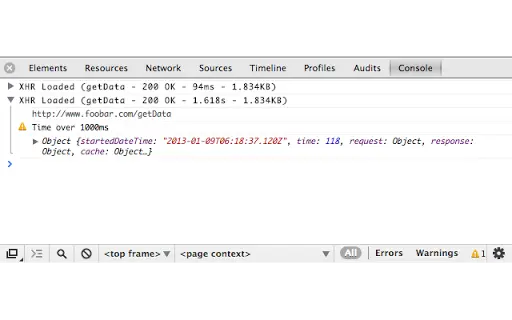
- Real-time AJAX Logging – Automatically captures every XMLHttpRequest, logging essential data such as HTTP status, response time, and response size directly in the Chrome Developer Tools Console.
- URL Navigation – Click on any logged request URL to open it in a new tab, preserving all input parameters for immediate inspection.
- Comprehensive Request Details – Offers deep visibility into low-level request data, including HTTP headers, request method, and full request/response object structure.
- Response Content Display (Optional) – Enables developers to view the raw response content when enabled, aiding in data validation and error analysis.
- Performance Warning System – Triggers alerts when a request exceeds a user-defined threshold, helping identify slow or unresponsive endpoints.
- Source Link Tracking – Displays the exact source file and line number where the AJAX call originated, simplifying code navigation and debugging.
These features are particularly useful during development sprints, API troubleshooting, and cross-browser compatibility testing. For example, a developer can quickly identify a 500 error from a specific endpoint and trace it back to the calling script. The ability to drill down into headers and payloads supports secure data validation and helps ensure correct authentication token handling. The tool operates seamlessly within the existing Chrome DevTools environment, requiring no additional setup or configuration.
User Interface, Workflow & Performance
The interface of AJAX Debugger is minimal and tightly integrated with Chrome’s Developer Tools Console. There are no standalone windows or complex dashboards—users interact solely through console output. Navigation is straightforward: once activated, the extension begins logging requests automatically, and all data appears in a structured format.
The workflow is efficient for developers already familiar with DevTools, as it adds functionality without altering the core interface. Users can click on URLs or expand objects to access deeper layers of information. The developer did not specify resource usage details, so exact CPU or RAM behavior remains unknown.
Performance observations are based on general software behavior patterns for lightweight browser extensions. Stability is expected to be high, given the tool’s focused scope and lack of background processes. No known conflicts with other DevTools extensions have been reported.
Compatibility & System Requirements
AJAX Debugger is compatible with Windows, Mac, and Linux operating systems, ensuring broad accessibility across development environments. It is designed specifically for the Chrome browser and requires no additional dependencies. The installation size is 250 KB, indicating a lightweight footprint that should not impact system performance.
The software version is 2.1.1, released on June 3, 2024. Exact system requirements were not listed, and compatibility information was partially provided. The extension does not require administrative privileges or special configurations for installation.
Users should ensure they are running a current version of Chrome to maintain compatibility with the latest DevTools APIs.
Pros and Cons
Pros
- Seamless integration with Chrome Developer Tools
- Lightweight at only 250 KB
- Free to use with no licensing restrictions
- Provides detailed request and response data
- Includes performance warning for slow requests
- Enables quick navigation to request URLs with parameters
Cons
- Only available for Chrome browser
- No standalone UI or dashboard
- Performance metrics are limited to console output
- Does not support other browsers like Firefox or Edge
- Response content display is optional and must be enabled manually
FAQ Section
Is AJAX Debugger available for browsers other than Chrome?
AJAX Debugger is currently designed exclusively for the Chrome browser. There is no official support for Firefox, Edge, or other Chromium-based browsers.
Is the tool secure to use?
Yes, the extension operates within Chrome’s sandboxed environment and does not transmit any user data externally. It only logs information locally within the browser’s Developer Tools.
How often does the extension update?
Updates are released as needed to maintain compatibility with Chrome and DevTools changes. The latest version, 2.1.1, was released on June 3, 2024.
Does it require a license or subscription?
No, AJAX Debugger is completely free and does not require any license or subscription to use.
Can I use it offline?
Yes, the extension functions fully offline. It logs AJAX activity and displays data locally in the console without requiring an internet connection.
Final Thoughts
AJAX Debugger delivers a focused, reliable solution for developers working with dynamic web applications. Its ability to log and display critical AJAX metrics directly in Chrome’s console makes it an essential tool for debugging API calls, monitoring performance, and validating request integrity. While limited to Chrome and lacking a visual dashboard, its simplicity and efficiency outweigh these constraints for its target audience.
The tool is particularly valuable during development and testing phases, where rapid insight into request behavior can significantly reduce troubleshooting time. With a minimal footprint and a free license, it offers strong value for professional and hobbyist developers alike. For anyone working with JavaScript-driven web apps, this extension is a must-have addition to their toolkit.
Download AJAX Debugger now.







